Yandex Cloud
Search
Contact UsTry it for free
  • Customer Stories
  • Documentation
  • Blog
  • All Services
  • System Status
  • Marketplace
    • Featured
    • Infrastructure & Network
    • Data Platform
    • AI for business
    • Security
    • DevOps tools
    • Serverless
    • Monitoring & Resources
  • All Solutions
    • By industry
    • By use case
    • Economics and Pricing
    • Security
    • Technical Support
    • Start testing with double trial credits
    • Cloud credits to scale your IT product
    • Gateway to Russia
    • Cloud for Startups
    • Center for Technologies and Society
    • Yandex Cloud Partner program
    • Price calculator
    • Pricing plans
  • Customer Stories
  • Documentation
  • Blog
© 2026 Direct Cursus Technology L.L.C.
Yandex DataLens
  • DataLens neuroanalyst
    • Overview
      • All visualizations
      • Line chart
      • Area chart
      • Normalized stacked area chart
      • Column chart
      • Normalized column chart
      • Bar chart
      • Normalized bar chart
      • Scatter chart
      • Pie chart
      • Combined chart
      • Tree chart
      • Donut chart
      • Table
      • Pivot table
      • Indicator
        • Overview
        • Point map
        • Point map with clusters
        • Polyline map
        • Choropleth map
        • Heat map
    • Adding chart info
    • Opening a chart as a table
    • Versioning
    • Exporting data from charts
    • Chart inspector
    • Access management
  • DataLens Gallery
  • Audit Trails events

In this article:

  • Map layer types
  • What you need to know about maps
  • Geolayers
  • What you can do with geolayers
  1. Charts
  2. Visualization reference
  3. Map
  4. Overview

Map in Yandex DataLens

Written by
Yandex Cloud
Improved by
Dmitry A.
Updated at December 30, 2025
  • Map layer types
  • What you need to know about maps
  • Geolayers
    • What you can do with geolayers

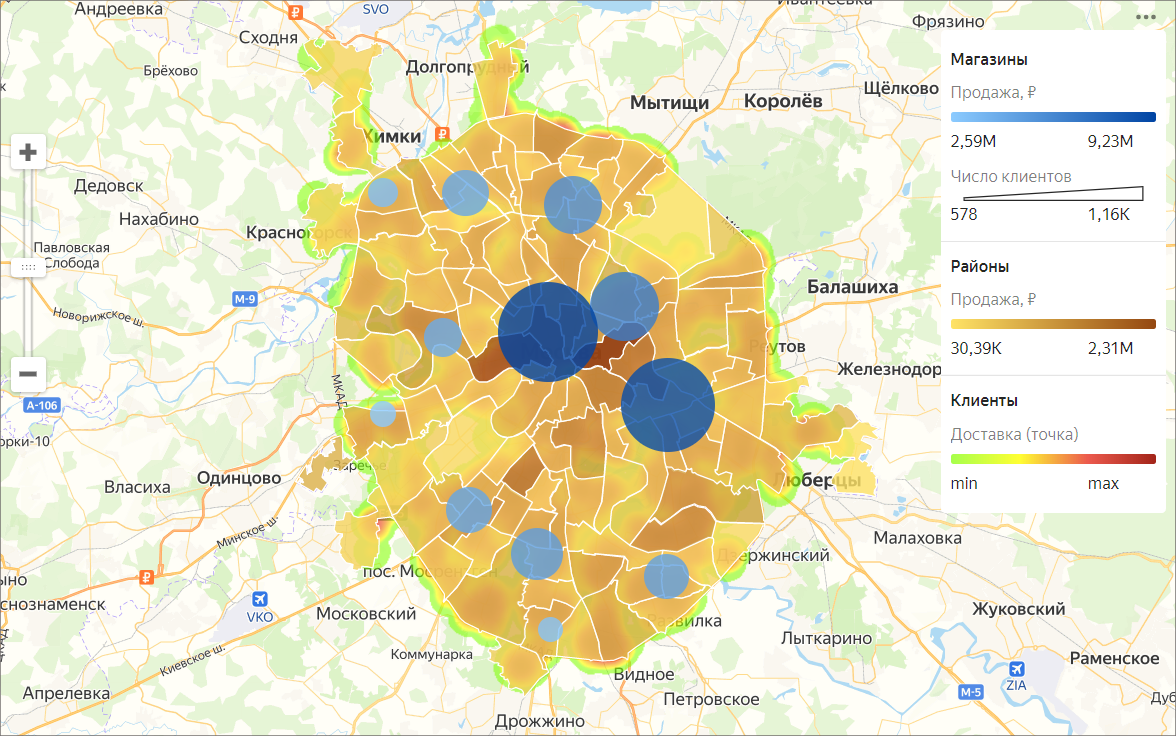
Maps are used for geoanalytics: displaying and analyzing business indicators on a map.

What you can see on mapsWhat you can see on maps

  • Population size and density.
  • Number of commercial facilities and their revenue.
  • Other measures potentially affecting business performance.

Map layer typesMap layer types

  • Areas

    A layer of this type represents entire areas or regions. The measure value is expressed through colors or hues.
    By adding tooltips with region names and measures you can make the chart info easier to read.

  • Points

    Points can represent individual objects, such as cities, stores, pickup points, or customer addresses.
    There are two ways to show the value: through point color and size.

  • Lines

    Lines are used to show connections between objects on the map, such as airline flights or cargo transportation routes.

  • Heatmap

    Shows the density of points on the map. This map type is useful for displaying large numbers of points and areas of their clustering.
    image

What you need to know about mapsWhat you need to know about maps

  • To create a map, add either coordinates with the Geopoint type or areas with the Geopolygon type to the data source.

  • Use the Center and Scale settings to show a portion of the map.

  • A single map supports up to five layers of any visualization type.

GeolayersGeolayers

Map chart layers are called geolayers. Geolayers are used to present measures as points or polygons.

What you can do with geolayersWhat you can do with geolayers

  • Rename a layer.
  • Set transparency using the slider.
  • Reorder layers within the visualization type.
    However, you cannot change the order of visualization types (top-to-bottom: point map, polyline map, chloropleth map, and heatmap).

You can purchase pre-calculated geolayers from partners in Yandex Cloud Marketplace.

Note

You cannot create maps in QL charts.

See alsoSee also

  • Creating a dashboard in Yandex DataLens
  • Adding a chart to a dashboard in Yandex DataLens
  • Adding a selector to a dashboard in Yandex DataLens

Was the article helpful?

Previous
Indicator
Next
Point map
© 2026 Direct Cursus Technology L.L.C.