Hardware monitoring

Certain system errors may result from hardware failures rather than Kubernetes or other components. To monitor such failures, Stackland provides a ready-made solution that collects data from various sources, such as kernel logs, sysfs, disk SMART data, and more.
This page tells you where you can view hardware status alerts and key charts, and explains the conditions that trigger these alerts.
Grafana dashboard
You can monitor your hardware in a dedicated dashboard:
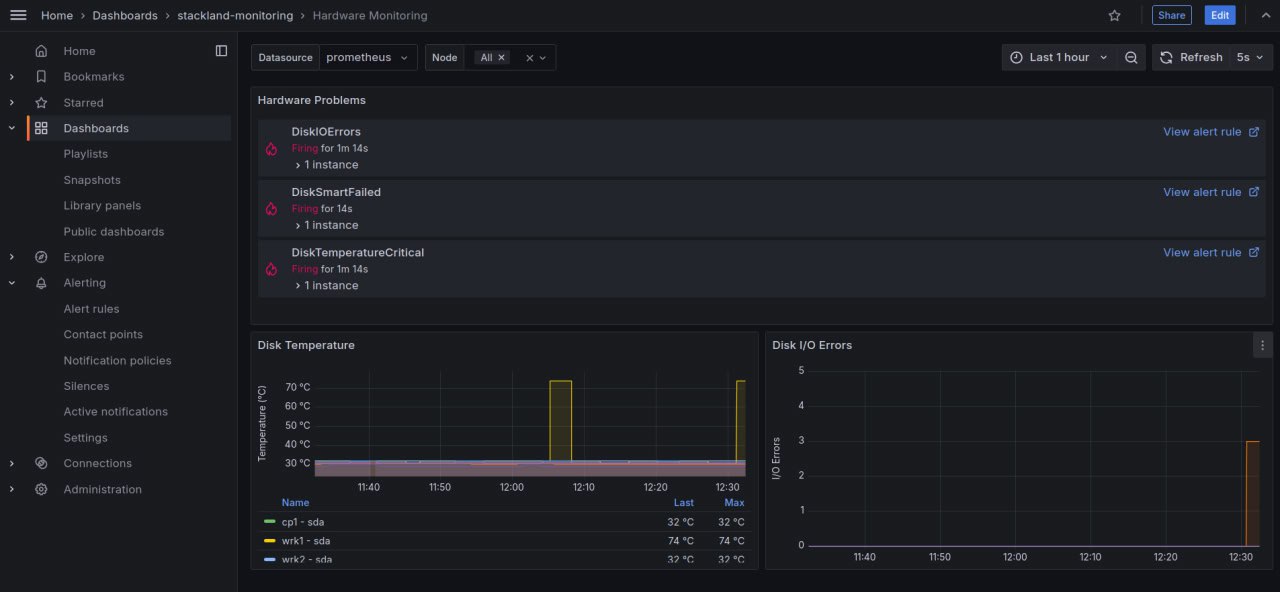
To open the hardware monitoring metric dashboard, open grafana.sys.<cluster domain> and navigate to Dashbords > stackland-monitoring > Hardware Monitoring.
The dashboard's first section shows hardware status warnings. For example, the first warning shown on the screenshot is DiskIOErrors. This check monitors disk read and write errors. You can find more checks below.
The dashboard includes two charts: Disk Temperature and Disk I/O Errors.
List of checks with alerts
The dashboard shows alerts that indicate check results.
|
Check name |
Description |
How it works |
|
DiskMissing |
Disk not found |
The system scans all available storage devices. If a previously available disk is not detected, the system logs a |
|
DiskIOErrors |
Disk read/write errors |
During read and write operations, the system and disk controller exchange data. If read or write issues occur, the system logs |
|
DiskSmartFailed |
Disk SMART failure |
If a SMART attribute exceeds the threshold defined by the disk manufacturer, the system logs a |
|
DiskSmartUnavailable |
Disk SMART failure |
If the disk's SMART stops working and no longer reports hardware status data, the system logs a |
|
DiskConnection |
Connection issues |
SMART attribute 199 shows the number of corrected errors during SATA data transfer. A growing value can signal cable, connection, controller, or disk issues. If the attribute value rises, the system logs a |
|
DiskTemperatureCritical |
High disk temperature |
SMART-enabled disks monitor their temperature and report it to the system. If the temperature approaches the maximum allowed value, the system logs a |