Getting started with Yandex Cloud Console

Cloud Console is a UI you can use to manage your cloud, folder, and service resources, set up notifications, and contact support.
To get started with the management console:
-
Create a Yandex ID account.
-
Log in to the management console.
When you log in to the management console for the first time, the
cloud-<Yandex_ID>cloud,defaultfolder, anddefaultnetwork are automatically created. -
Create a billing account. The
cloud-<Yandex_ID>cloud will be linked to it automatically.When you create your first billing account, you get an initial grant to get started with the platform.
-
Create your first resource, e.g., a Linux VM.
Management console UI
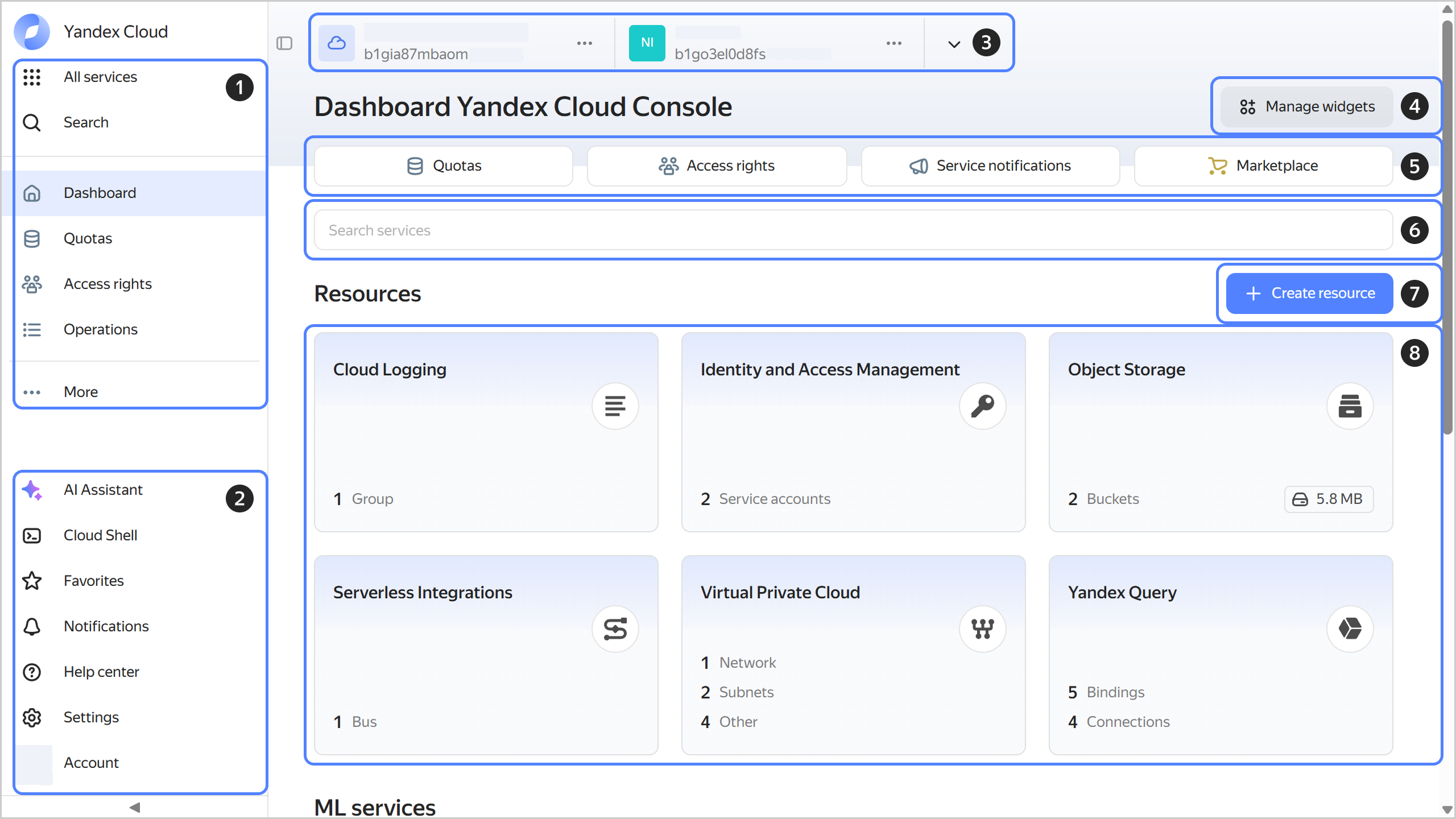
-
Navigating through services and main sections of the management console.
-
Additional management console features and settings:
-
AI assistant: Your smart assistant for creating and deleting Yandex Cloud resources.
-
Cloud Shell: Your environment with the main tools you need to manage cloud resources.
-
Favorites: Resources you will have access to from any service.
-
Notifications: Notifications about your cloud events.
-
Support center: Everything to streamline your Yandex Cloud experience.
-
Settings: Management console settings.
-
Account: Authentication management.
-
-
Navigating through available clouds and folders.
-
Managing widget layout and visibility on the dashboard.
-
Main sections of your dashboard:
- Quotas: Organizational constraints you can change by contacting support.
- Access rights: Set up access permissions for your cloud and folder.
- Service notifications: Manage cloud user subscriptions for technical notifications from the services.
- Marketplace: Navigation to Yandex Cloud Marketplace.
-
Searching for the right service.
-
Creating a new resource.
-
Resources created in selected folder.
What's next
-
Check out the list of all Yandex Cloud services.
-
If you need to set up Single Sign-On (SSO) for corporate accounts, add a federation to Yandex Identity Hub.
-
Add users to your organization and grant them access to Yandex Cloud resources.