Manual instrumentation of LLM applications

Manual instrumentation of LLM applications gives you complete control over traces. You can choose which operations to create spans for, which attributes to add, and how to build the call hierarchy.
Manual instrumentation is useful in the following cases:
- Your framework is not supported by auto-instrumentation.
- You need to add business context: User ID, session ID, prompt version, A/B test parameters.
- You need to mark up complex agent logic: cross-LLM routing, data preprocessing, response post-processing.
- You need to instrument modified tools not covered by auto-instrumentation.
Manual instrumentation uses the OpenTelemetry SDK and OpenTelemetry semantic conventions for GenAI. This section gives markup examples for Python.
Main conventions
Follow these conventions to make sure traces are displayed correctly:
- OpenTelemetry standard. Use attributes from the OpenTelemetry standard for GenAI.
- Service isolation. Each LLM agent must send spans with a unique
service.nameattribute value. This is important for correct data filtering in the monitoring system. - Required attributes. Some attributes are required to correctly visualize traces in the interface; see the table below.
Required attributes of generation spans
To ensure traces are correctly displayed in the Monium Traces LLM monitoring interface, specify the attributes listed below. This table shows the data required to display each interface element.
|
Data |
Attribute |
Type |
Comment |
|
Number of input data tokens |
|
int |
|
|
Number of tokens per response |
|
int |
|
|
Input messages (prompts, dialog history, tool calling results) |
|
JSON array |
Format: see Message format. |
|
System prompt |
|
JSON / string |
System message separate from chat history. When using |
|
Model response |
|
JSON array |
Format: see Message format. |
|
Operation type |
|
string |
Determines span display. The valid values are |
|
Responding model name |
|
string |
|
|
List of available tools |
|
JSON array |
LLM tool signatures. The interface displays the Available tools section. |
In addition to the specified attributes, the OpenTelemetry standard also describes other useful attributes for GenAI spans, such as gen_ai.system, gen_ai.request.model, gen_ai.tool.definitions, etc. For the full list of attributes with descriptions, see the OpenTelemetry convention for GenAI.
Message format
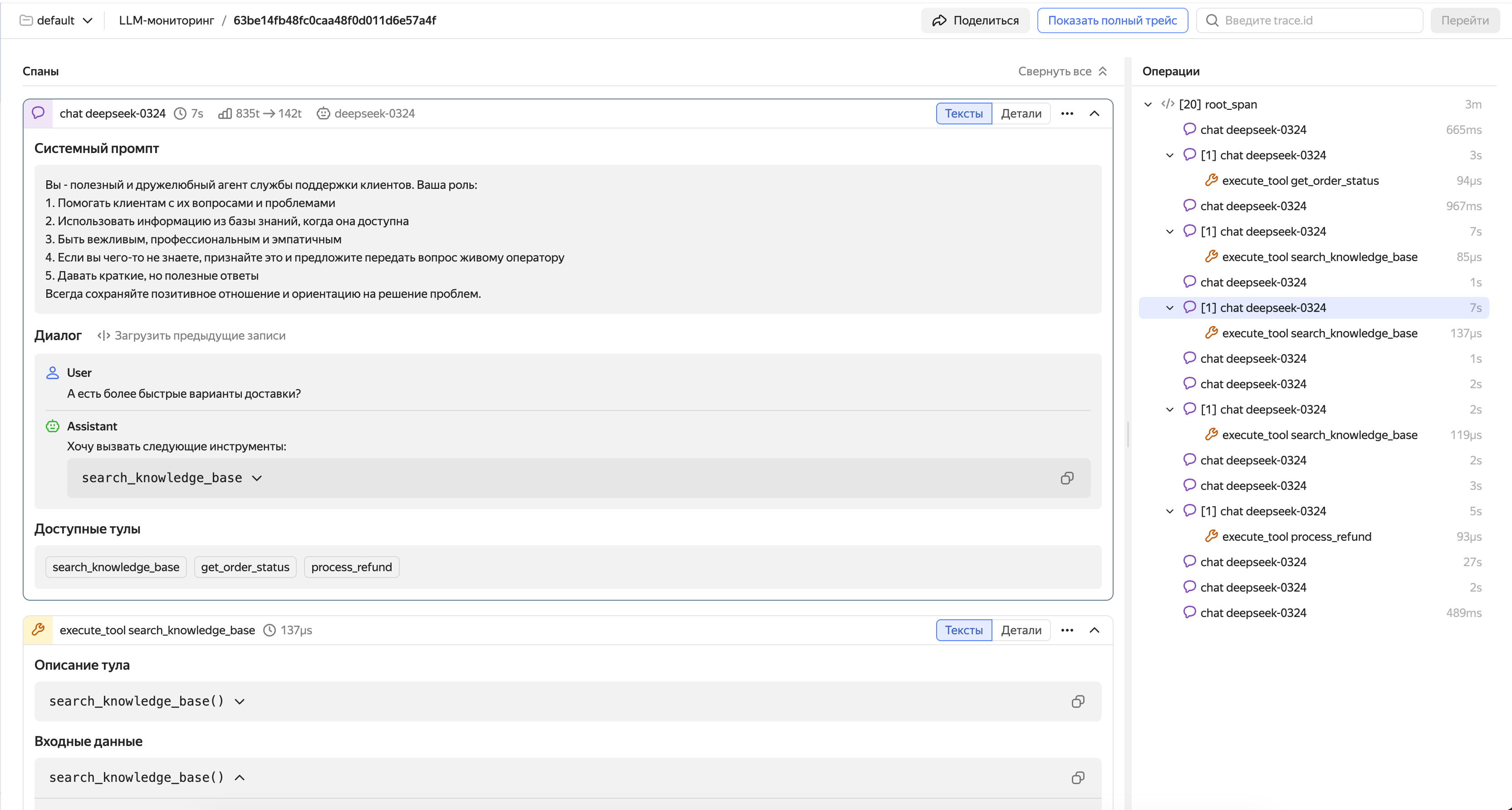
The gen_ai.input.messages and gen_ai.output.messages attributes contain JSON serialized into a string. Avoid the simplified {role, content} format; instead, use the parts field indicating type.
You can provide the system prompt in two ways: as an element with role == system inside gen_ai.input.messages (see examples below) or as a separate gen_ai.system_instructions attribute (a JSON array with { "type": "text", "content": "..." } objects).
Input messages (gen_ai.input.messages):
[{
    "role": "user",
    "parts": [
      {
        "type": "text",
        "content": "Weather in Paris?"
      }
    ]
  },
  {
    "role": "assistant",
    "parts": [
      {
        "type": "tool_call",
        "id": "call_VSPygqKTWdrhaFErNvMV18Yl",
        "name": "get_weather",
        "arguments": {
          "location": "Paris"
        }
      }
    ]
  },
  {
    "role": "tool",
    "parts": [
      {
        "type": "tool_call_response",
        "id": " call_VSPygqKTWdrhaFErNvMV18Yl",
        "result": "rainy, 57°F"
      }
    ]
  }
]
For a detailed input message JSON schema, see this OpenTelemetry guide.
Output messages (gen_ai.output.messages):
[
  {
    "role": "assistant",
    "parts": [
      {
        "type": "text",
        "content": "The weather in Paris is currently rainy with a temperature of 57°F."
      }
    ],
    "finish_reason": "stop"
  }
]
OR
[
  {
    "role": "assistant",
    "parts": [
      {
        "type": "tool_call",
        "id": "call_VSPygqKTWdrhaFErNvMV18Yl",
        "name": "get_weather",
        "arguments": {
          "location": "Paris"
        }
      }
    ],
    "finish_reason": "tool_call"
  }
]
For a detailed output message JSON schema, see this OpenTelemetry guide.
If the model is calling a tool, the output message must contain parts with the tool_call type:
[
  {
    "role": "assistant",
    "parts": [
      {
        "type": "tool_call",
        "id": "call_abc123",
        "name": "get_weather",
        "arguments": {
          "location": "Paris"
        }
      }
    ],
    "finish_reason": "tool_call"
  }
]
The result returned by the tool is provided in the following request to the model in gen_ai.input.messages with role == tool:
[
  {
    "role": "tool",
    "parts": [
      {
        "type": "tool_call_response",
        "id": "call_abc123",
        "response": "rainy, 18°C"
      }
    ]
  }
]
Example of a span featuring a conversation with an LLM agent
Model reasoning in spans
In reasoning mode, the model responds based on a chain of reasoning. To view this chain separately from the final response in the conversation history, mark it up as a portion of the message with the reasoning type. In the agent span, this portion will be highlighted with the Thinking label.
Format of the reasoning section of the message
To mark up the reasoning, provide a message containing role == "assistant" in the gen_ai.output.messages attribute. Add a separate element to the parts array:
{
  "type": "reasoning",
  "content": "<reasoning_text>"
}
Both fields are required:
type: Message part type, alwaysreasoning.content: Model's reasoning text.
In a single message, you can deliver the reasoning, the response text, and the call for the tool by separate elements of the parts array. In the interface, all parts of the message are displayed in the same order in which they are specified in the parts array.
Example of the reasoning message
Here is an example of the gen_ai.output.messages attribute value with the reasoning and the final response:
[
  {
    "role": "assistant",
    "parts": [
      {
        "type": "reasoning",
        "content": "**Check for a table**\n\nThe check revealed that there is no `monthly_sales` table in the `reports` schema of the `analytics` database. You need to create a table before uploading the report."
      },
      {
        "type": "text",
        "content": "Before uploading the report, create a table titled `reports.monthly_sales` in the `analytics` database."
      }
    ],
    "finish_reason": "stop"
  }
]
Images in spans
Images from the model dialog are automatically displayed in the span if they are correctly described in the gen_ai.input.messages and gen_ai.output.messages attributes. There is no need for separate spans for images because images are already included in the message history.
An image is described as an object belonging to the parts array alongside text queries, model responses, tool calls and their responses. An image can form a part of a user's request (gen_ai.input.messages) or a model's response (gen_ai.output.messages).
Structure of the parts array fragment with an image:
"parts": [
  ...
  {
    "type": "uri",
    "modality": "image",
    "uri": "https://cdn.example.com/some_image.jpg",
    "mime_type": "image/jpeg"
  },
  ...
]
Where:
-
type: For objects with image description the value is alwaysuri. -
modality: For objects with image description the value is alwaysimage. -
uri: Direct link to the image with thehttps://schema. -
mime_type: MIME file type.image/jpegimage/pngimage/webpimage/gifimage/svg+xml
Note
All four parameters are required.
A single message can contain several parts of different types, e.g., text and image. In the Monium interface, all parts will be displayed in the span in the same order in which they are listed in the parts array. Images will be automatically displayed inside the span as previews the moment the span becomes visible on the screen. Click the preview to open the full-size version of the image.
Image link requirements
Monium does not proxy images provided in LLM traces. The user's browser uploads them directly from the source specified in the link. Therefore, image URLs must meet the following requirements:
-
URL schema: Only
https://allowed.The browser will block links with the
http://schema asmixed content.Moniumdoes not support links to images with thedata:schema and Base64 encoding.Tip
You can get a link with the
https://schema by uploading the image to a Yandex Object Storage bucket or to a Yandex Cloud CDN resource. -
Accessibility from user's browser: If the browser does not have access to the image, the image will not be displayed in the Monium span. For example, a link to an intranet resource will not open in the browser on a computer not connected to that intranet.
Signed URLs will continue to open until the signature expires.
Examples of messages with images
gen_ai.input.messages:
[
  {
    "role": "user",
    "parts": [
      {
        "type": "text",
        "content": "What do you see in this picture?"
      },
      {
        "type": "uri",
        "modality": "image",
        "uri": "https://example.com/photo.jpg",
        "mime_type": "image/jpeg"
      }
    ]
  }
]
gen_ai.output.messages:
[
  {
    "role": "assistant",
    "parts": [
      {
        "type": "text",
        "content": "The picture depicts a sunset over the sea with silhouettes of yachts."
      }
    ],
    "finish_reason": "stop"
  }
]
gen_ai.input.messages:
[
  {
    "role": "user",
    "parts": [
      {
        "type": "text",
        "content": "Draw the interface of an ideal Observability system"
      }
    ]
  }
]
gen_ai.output.messages:
[
  {
    "role": "assistant",
    "parts": [
      {
        "type": "uri",
        "modality": "image",
        "uri": "https://cdn.ya.ru/generated/monium.png",
        "mime_type": "image/png"
      }
    ],
    "finish_reason": "stop"
  }
]
Tool call spans
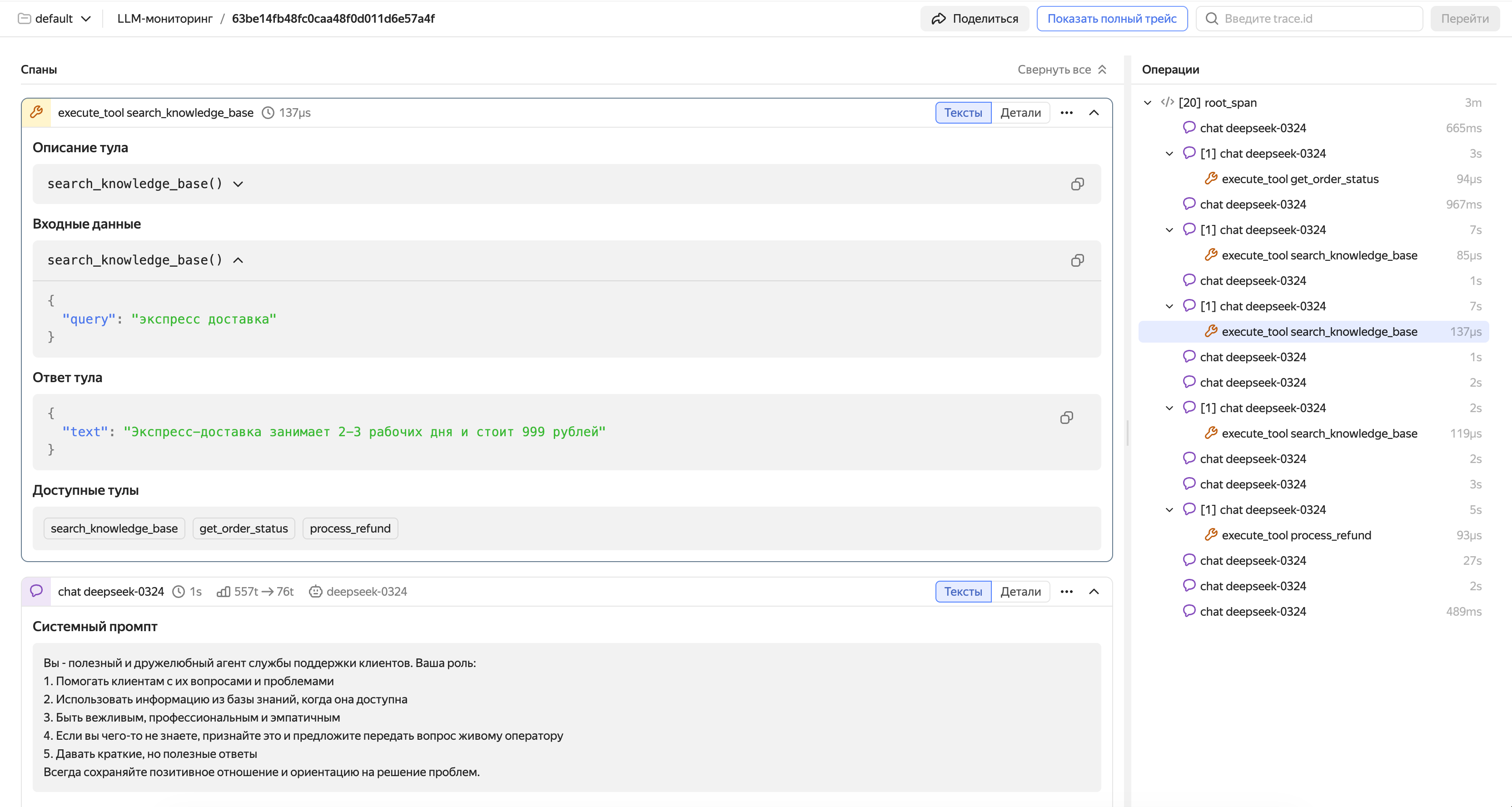
For each tool call, create a child span with gen_ai.operation.name="execute_tool". This allows the interface to display the end-to-end chain: request → model decides to call tool → tool executes → model receives result → final response.
Recommended attributes for a tool call span:
|
Attribute |
Description |
Example |
|
|
Type of operation. For tool spans, set to |
|
|
|
Name of the tool to call |
|
|
|
Tool description |
|
|
|
JSON array with tool description in JSON schema format (serialized into a string) |
See the code below for an example. |
|
|
Call arguments (serialized into a string via |
|
|
|
Execution result (serialized into a string via |
|
For more examples of proper instrumentation across various scenarios (tool calls, streaming, multimodality), see the Examples: LLM Calls section in the OpenTelemetry docs.
Example of a span featuring a tool call
Code example
Below is the simplest manual instrumentation example for an agent based on the OpenAI API with a single tool (weather). The model and tool call loop is implemented explicitly so the code includes all generation span and tool span attrubutes from the above tables.
Install the dependencies
pip install opentelemetry-sdk opentelemetry-exporter-otlp-proto-grpc openai
Configure the environment variables
Set the variables for connecting to Monium Traces and the OpenAI key. Run the commands one by one, substituting your values:
export OTEL_EXPORTER_OTLP_ENDPOINT="ingest.monium.yandex.cloud:443"
export OTEL_EXPORTER_OTLP_HEADERS="Authorization=Api-Key <your_API_key>,x-monium-project=<project_name>,x-monium-service=my-ai-agent"
export OTEL_SERVICE_NAME="my-ai-agent"
export OPENAI_API_KEY="<your_OpenAI_key>"
Where:
<your_API_key>: API key of the service account with themonium.traces.writerrole.<project_name>: Project name infolder__<folder_ID>format, e.g.,folder__b1g2e3abc4def5ghij6k.
For more information on special Monium headers, see Headings.
Agent code
Save the code to the agent.py file. This step-by-step example demonstrates which attributes to set for a generation span (conversation) and tool call span.
import json
from openai import OpenAI
from opentelemetry import trace
from opentelemetry.trace import Status, StatusCode
from opentelemetry.sdk.trace import TracerProvider
from opentelemetry.sdk.trace.export import BatchSpanProcessor
from opentelemetry.exporter.otlp.proto.grpc.trace_exporter import OTLPSpanExporter

provider = TracerProvider()
provider.add_span_processor(BatchSpanProcessor(OTLPSpanExporter()))
trace.set_tracer_provider(provider)
tracer = trace.get_tracer("my_ai_agent")

TOOL_DEF = {
    "type": "function",
    "name": "get_weather",
    "description": "Get current weather for a city",
    "parameters": {"type": "object", "properties": {"city": {"type": "string"}}, "required": ["city"]},
}


def get_weather(city: str) -> dict:
    return {"temperature": 18, "condition": "cloudy", "city": city}


def to_otel_messages(messages: list) -> list:
    """Format: gen_ai.input.messages / output: parts with type text | tool_call | tool_call_response."""
    out = []
    for m in messages:
        role, content = m["role"], m.get("content") or ""
        if role in ("system", "user"):
            out.append({"role": role, "parts": [{"type": "text", "content": content}]})
        elif role == "assistant":
            parts = [{"type": "text", "content": content}] if content else []
            for tc in m.get("tool_calls", []):
                fn = tc["function"]
                args = json.loads(fn["arguments"]) if isinstance(fn["arguments"], str) else fn["arguments"]
                parts.append({"type": "tool_call", "id": tc["id"], "name": fn["name"], "arguments": args})
            out.append({"role": "assistant", "parts": parts})
        elif role == "tool":
            out.append({"role": "tool", "parts": [{"type": "tool_call_response", "id": m["tool_call_id"], "response": m["content"]}]})
    return out


def run_agent(user_query: str, messages: list | None = None) -> str:
    client = OpenAI()
    model = "gpt-4o-mini"
    tools_spec = [{"type": "function", "function": {"name": "get_weather", "description": TOOL_DEF["description"], "parameters": TOOL_DEF["parameters"]}}]
    if messages is None:
        messages = [
            {"role": "system", "content": "You are a helpful assistant. Use get_weather for weather questions."},
            {"role": "user", "content": user_query},
        ]
    else:
        messages.append({"role": "user", "content": user_query})

    while True:
        with tracer.start_as_current_span("gen_ai.chat") as span:
            span.set_attribute("gen_ai.operation.name", "chat")
            span.set_attribute("gen_ai.system", "openai")
            span.set_attribute("gen_ai.request.model", model)
            span.set_attribute("gen_ai.input.messages", json.dumps(to_otel_messages(messages)))
            span.set_attribute("gen_ai.tool.definitions", json.dumps([TOOL_DEF]))
            try:
                resp = client.chat.completions.create(model=model, messages=messages, tools=tools_spec)
            except Exception as e:
                span.record_exception(e)
                span.set_status(Status(StatusCode.ERROR, str(e)))
                return ""

            msg = resp.choices[0].message
            usage = resp.usage
            span.set_attribute("gen_ai.response.model", resp.model)
            span.set_attribute("gen_ai.usage.input_tokens", usage.prompt_tokens)
            span.set_attribute("gen_ai.usage.output_tokens", usage.completion_tokens)
            out_msg = [{"role": "assistant", "parts": [], "finish_reason": "stop"}]
            if msg.content:
                out_msg[0]["parts"].append({"type": "text", "content": msg.content})
            for tc in msg.tool_calls or []:
                args = json.loads(tc.function.arguments) if isinstance(tc.function.arguments, str) else tc.function.arguments
                out_msg[0]["parts"].append({"type": "tool_call", "id": tc.id, "name": tc.function.name, "arguments": args})
            if out_msg[0]["parts"] and out_msg[0]["parts"][-1].get("type") == "tool_call":
                out_msg[0]["finish_reason"] = "tool_call"
            span.set_attribute("gen_ai.output.messages", json.dumps(out_msg))

            if not msg.tool_calls:
                messages.append({"role": "assistant", "content": msg.content or ""})
                return (msg.content or "").strip()

            # The next API request is the model response and tool results
            messages.append({
                "role": "assistant",
                "content": msg.content or "",
                "tool_calls": [{"id": t.id, "type": "function", "function": {"name": t.function.name, "arguments": t.function.arguments}} for t in msg.tool_calls],
            })
            for tc in msg.tool_calls:
                args = json.loads(tc.function.arguments) if isinstance(tc.function.arguments, str) else tc.function.arguments
                with tracer.start_as_current_span("gen_ai.execute_tool") as tool_span:
                    tool_span.set_attribute("gen_ai.operation.name", "execute_tool")
                    tool_span.set_attribute("gen_ai.tool.name", tc.function.name)
                    tool_span.set_attribute("gen_ai.tool.description", TOOL_DEF["description"])
                    tool_span.set_attribute("gen_ai.tool.definitions", json.dumps([TOOL_DEF]))
                    tool_span.set_attribute("gen_ai.tool.call.arguments", json.dumps(args))
                    try:
                        result = get_weather(args.get("city", ""))
                        tool_span.set_attribute("gen_ai.tool.call.result", json.dumps(result))
                    except Exception as e:
                        tool_span.record_exception(e)
                        tool_span.set_status(Status(StatusCode.ERROR, str(e)))
                        raise
                messages.append({"role": "tool", "tool_call_id": tc.id, "content": json.dumps(result)})


if __name__ == "__main__":
    history = [
        {"role": "system", "content": "You are a helpful assistant. Use get_weather for weather questions."},
    ]
    with tracer.start_as_current_span("agent.demo"):
        print("Response:", run_agent("Hello! Who are you?", history))
        print("Weather:", run_agent("What is the weather like in Paris?", history))
Run the agent
python agent.py
After the agent finishes running, the Monium Traces interface will display a trace with the agent.demo root span: it includes the generation spans (conversation) and, when requesting weather, the child spans of the tool call. The gen_ai.input.messages attribute of the last generation span will contain the full conversation history (system prompt, both user requests, and model responses). For more information on working with the interface, see Viewing and analyzing LLM traces.
Compatibility with auto-instrumentation
Manual and auto-instrumented spans integrate seamlessly within a single trace. This enables you to implement a hybrid approach: use auto-instrumentation for baseline coverage and add manual spans to provide more context as needed.
For example, if your agent uses the OpenAI SDK with auto-instrumentation, you can manually create a root span for the entire agent operation, and LLM calls will be automatically captured as child spans. This ensures end-to-end visibility of the agent’s wirkflow, from the user request to the final response.
A bucket is a portion of Yandex Object Storage allocated for user data. For more information, see Bucket in Object Storage.
A resource is Yandex Cloud CDN's main logical entity allowing you to configure and manage content distribution from sources through points of presence. For more information, see CDN resource.
A pre-signed URL is a URL containing request authorization data in its parameters. For more information on how signed URLs are implemented in Yandex Object Storage, see this section.